How to Sign Documents Online with Legal Validity
Step by step, see how our qualified electronic signature works — with the same legal effect as a notarized signature.
Table of contents
What is qualified electronic signature?
Qualified electronic signature is the most secure form of digital signature with full legal effect across the European Union. It is regulated by the eIDAS Regulation (EU Regulation 910/2014) and has the same legal validity as a handwritten signature notarized before a notary.
Did you know…?
A document signed with a qualified electronic signature has full validity in court and cannot be repudiated by the signer (non-repudiation). It is equivalent to a notarized handwritten signature.
Key features:
Full legal validity
Admissible as evidence in court with presumption of authenticity
Multifactor authentication
Email verification + SMS one-time code (OTP)
Audit certificate
Full audit trail with date, time, IP and evidence
Timestamping
Qualified timestamp certifying the exact signing time
🏛️ Certified provider: we use Signaturit, a Qualified Trust Service Provider (QTSP) certified under the eIDAS Regulation, ensuring regulatory compliance and full legal effect across the European Union.
Our electronic signature
A single signature type, with every guarantee included and a flat price: 2 credits per envelope, no matter how many people sign.
🔐 Advanced Electronic Signature
2 credits per envelopeSignature with full legal effect. The price is the same whether 1 person signs or 6 do.
🏆 Use cases: rental contracts, employment, sales, loans, NDAs, powers of attorney
💡 No surprises on price:
You are charged 2 credits for every document you send to sign, not per signer. Adding parties to a rental, employment or sales contract does not make the envelope more expensive.
Upload your document
First, get your document ready in your dashboard. Two ways to do it:
ACreate from a template
- Go to "Templates" in the main menu
- Pick the template you need
- Personalize the content with your data
- Save the document to your dashboard
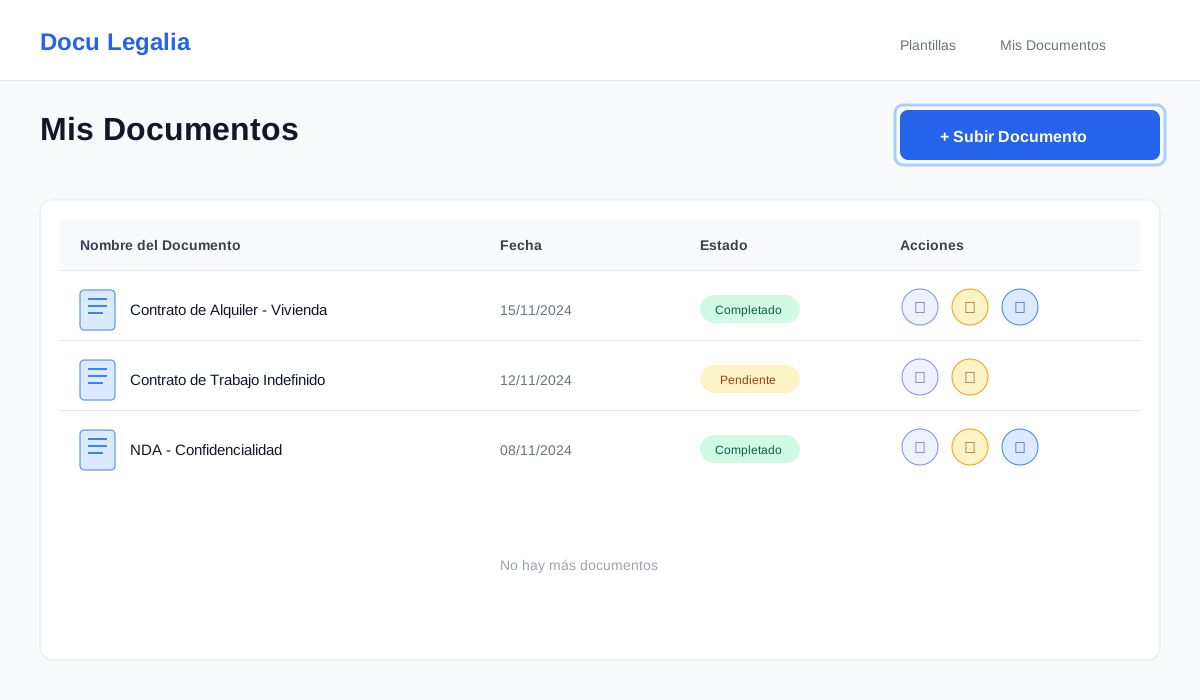
BUpload your own document
- Go to "My Documents"
- Click "Upload document"
- Choose your PDF or Word file
- The system converts it automatically
⚠️ Before sending:
- ✓ Review the document for completeness and errors
- ✓ Make sure all parties are correctly identified
- ✓ Verify amounts, dates and key data
- ✓ Once sent to sign, the document cannot be modified
Review the signature and its cost
Once your document is ready, click "Send to sign". A form opens showing the cost of the envelope and everything the signature includes.
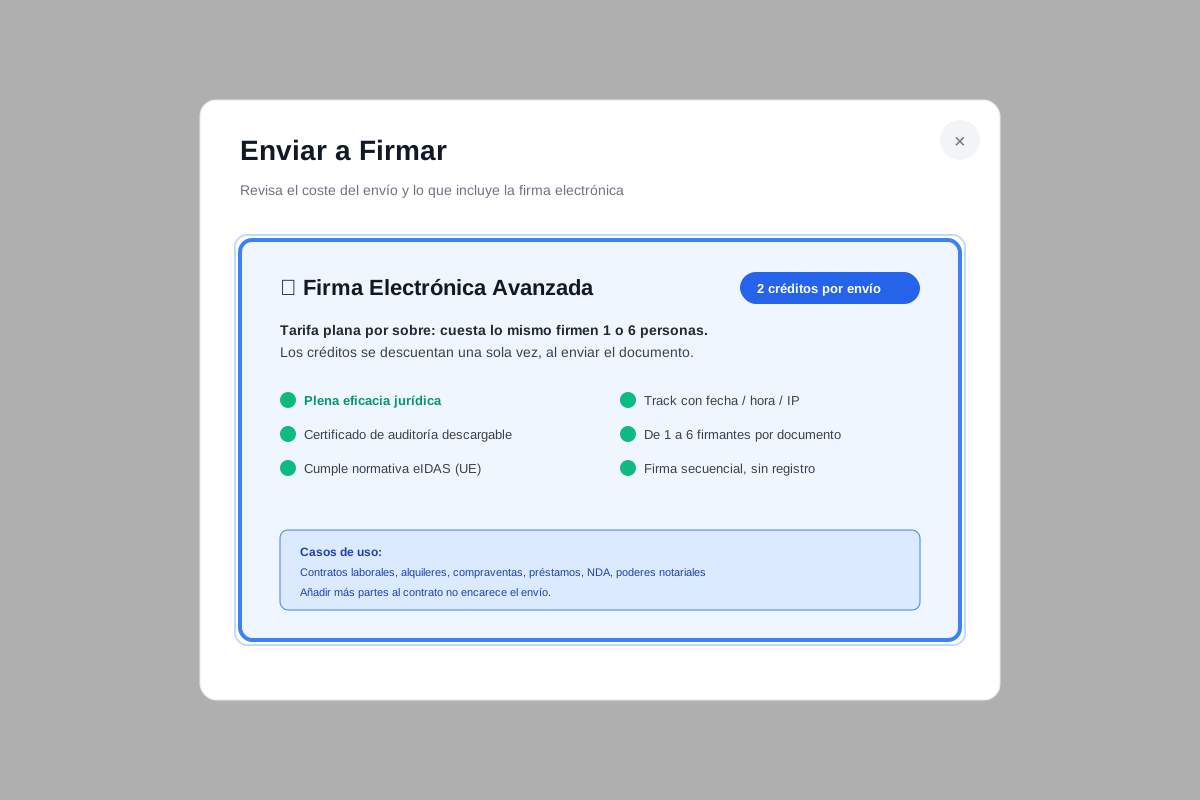
💰 Transparent credit system
The system shows the cost before you send. It is always the same:
For every document you send to sign
* Flat rate per envelope: credits are charged once on send, regardless of the number of signers (max 6).
💡 Pro tip:
Add every party to the contract from the start. Since the price does not depend on the number of signers, including everyone in a single envelope costs the same and saves you from repeating the process.
Add the signers
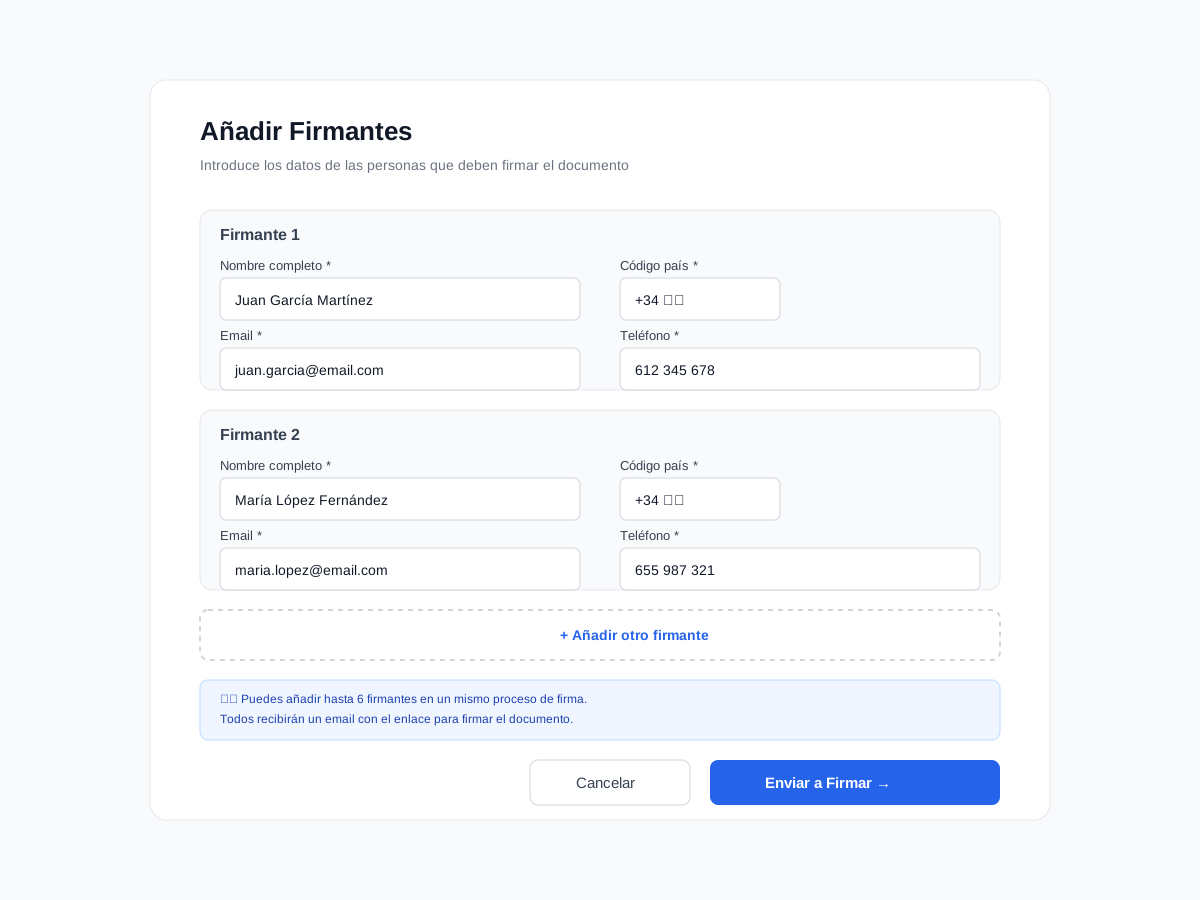
Now enter the data of every person who must sign. You can add up to 6 signers in a single process.
📝 Required data per signer:
Full name
First and last name as they appear on the signer's national ID
Email address that will receive the signing link
Country code
International phone prefix (e.g. +34 for Spain, +1 for the USA, +44 for the UK)
Phone number
Mandatory for SMS Advanced Signature / Optional for Simple Signature
Numbers only, no spaces or dashes (e.g. 666555444)
Smart autofill
If you created the document from one of our templates, the system automatically detects the parties and pre-fills the signer data for you. Just review and confirm.
✅ Best practices:
- ✓ Double-check that emails are correct
- ✓ Make sure phone numbers are active
- ✓ Use the official full name
- ✓ Tell signers in advance
❌ Common mistakes:
- ✗ Email with typos
- ✗ Phone with spaces or dashes
- ✗ Wrong country code
- ✗ Not warning the signer beforehand
Send to sign
Once you have reviewed everything, click the "Send to sign" button. The system runs the following steps automatically:
Credit check
The system verifies you have enough credits in your account. If not, it asks you to top up.
Credit deduction
2 credits are deducted from your balance, regardless of the number of signers.
Send to Signaturit
The document is securely encrypted and sent to Signaturit (our certified QTSP provider).
Signer notifications
Each signer receives an email with a unique, secure link to access and sign the document.
Confirmation
You get a notification confirming the document was sent for signing successfully.
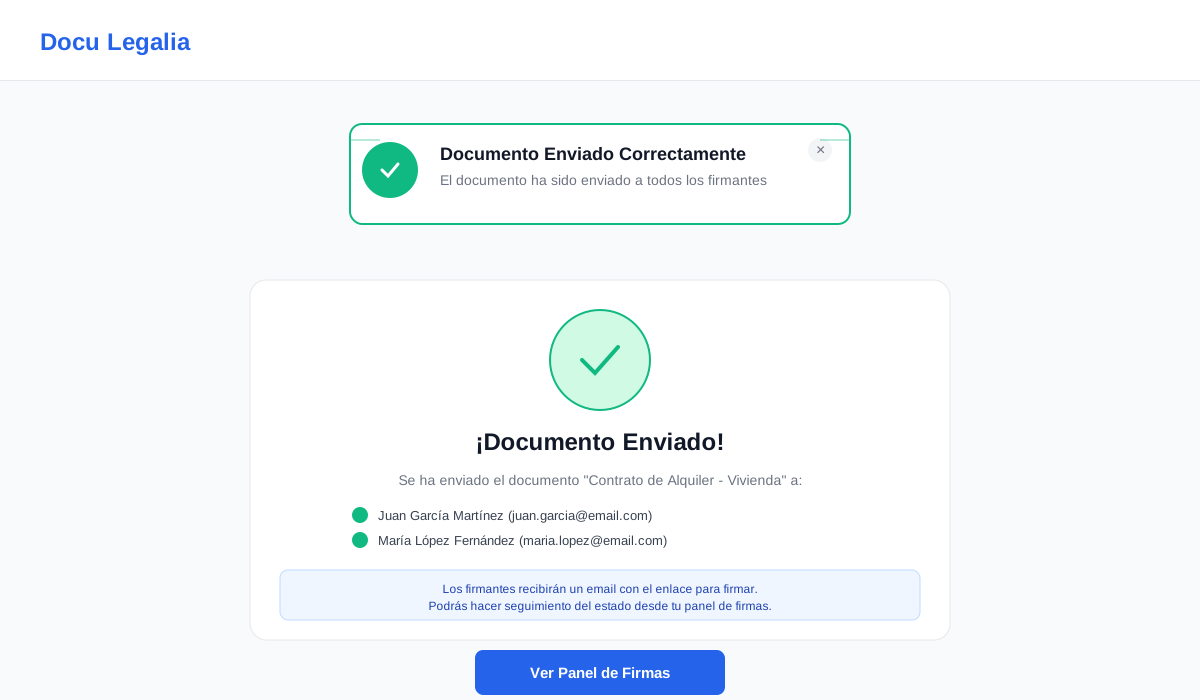
✅ Process started successfully!
From this moment on, signers can proceed to sign. The flow is fully automated and you'll get a notification on every signature.
Signing flow for signers
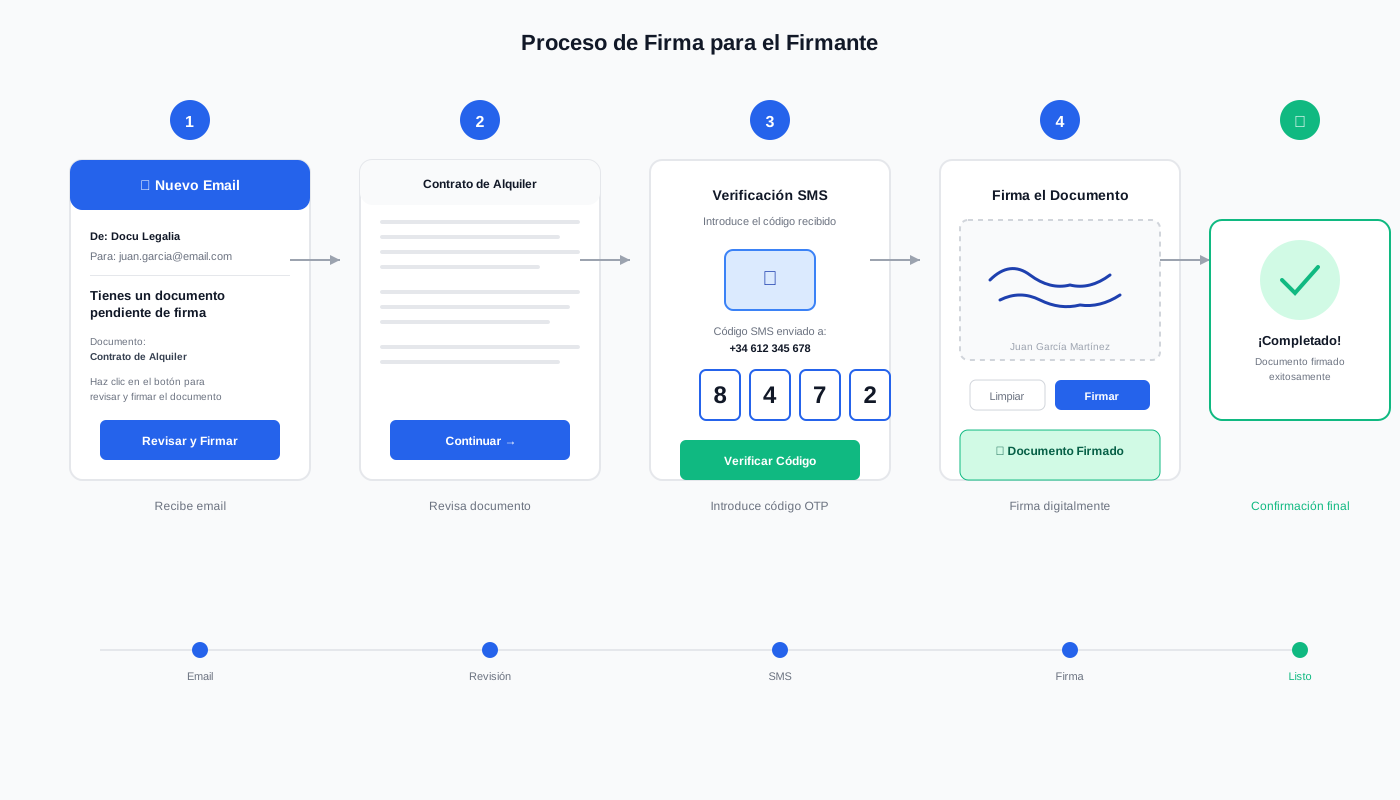
Once you've sent the document, each signer receives an email and follows these steps to sign:
1Receiving the email
The signer gets an email from Signaturit with the subject "You have a document pending signature". The email includes:
- Document name
- Sender (your name)
- "View and sign document" button
- Expiration date (if applicable)
2Accessing the document
Clicking the link, the signer reaches a secure page where they can view the full document before signing. They can read it carefully and download it for review.
3Identity verification (SMS Advanced Signature)
If you picked SMS Advanced Signature, the signer must verify their identity:
- Click "Sign document"
- Receive a 6-digit SMS code on their phone
- Enter the code on screen
- The system validates the code (valid for 5 minutes)
* For Simple Signature this step is not required. The signer can sign directly from the email.
4Signing the document
After verifying their identity, the signer:
- Sees the document with the signature field highlighted
- Can draw their signature with mouse or finger
- Or pick a predefined signature with their name
- Ticks the "I accept the terms of the document" checkbox
- Clicks "Confirm signature"
5Confirmation
The signer receives an email confirmation that their signature was registered. They can also download a copy of the signed document.
Signing time
The full signing flow takes 2–5 minutes per signer. It is fully guided and intuitive, even for non-technical users.
Mobile-friendly
Signers can sign from any device: desktop, tablet or smartphone. The UI is 100% optimized for mobile.
Real-time tracking
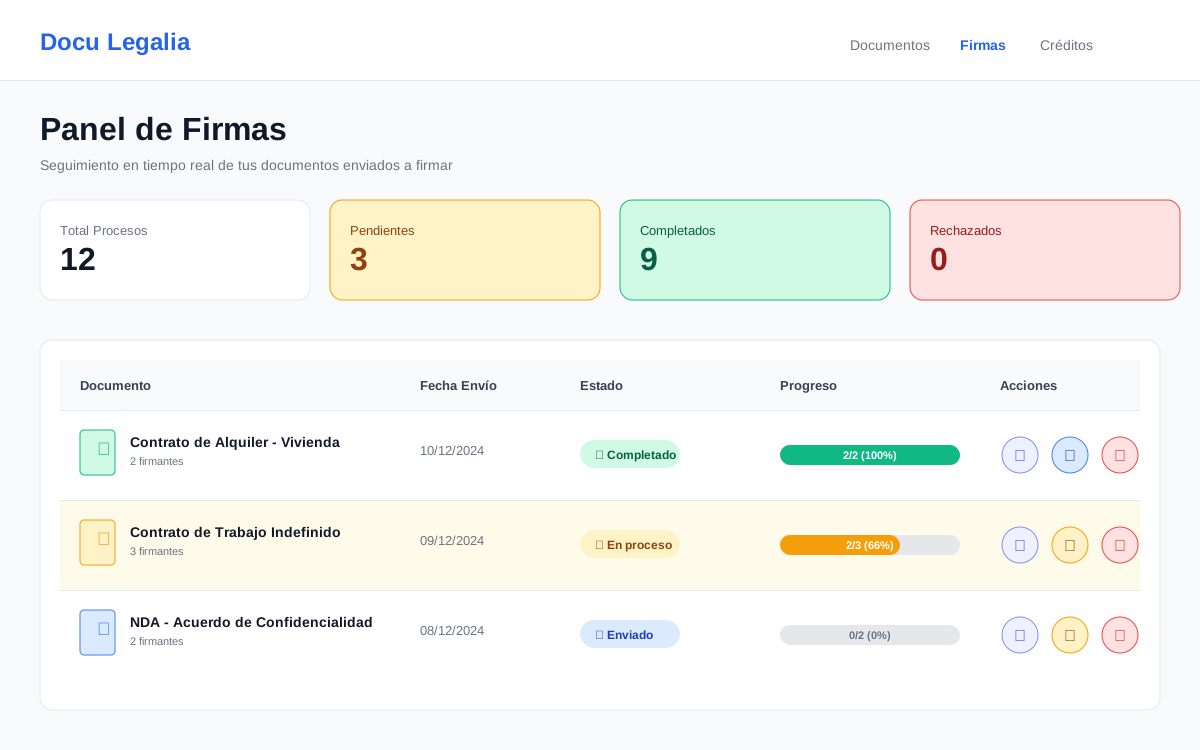
From your "Signatures" dashboard you can track each document sent to sign in real time. You get full visibility of the process.
📊 Real-time information available:
Overall status
- • Pending: Awaiting send
- • Sent: Signing in progress
- • Signed: Completed by everyone
- • Rejected: A signer rejected it
- • Expired: Past the deadline
Per-signer status
- • Signer name
- • Email and phone
- • Status: Pending or Signed
- • Signing date and time (if applicable)
- • IP address from which they signed
Visual progress
Progress bar showing the percentage of signers who have completed the signature. E.g.: "2 of 3 signers (66%)"
Important dates
- • Sent date
- • Expiration date (if applicable)
- • Completion date
- • Last updated
⚡ Available actions:
Resend reminder
If a signer hasn't signed yet, send them a reminder email with one click.
Refresh status
Pull the current state from Signaturit in real time and update the local information.
View full details
Open a detailed view with all signer info and evidence.
Download the signed document
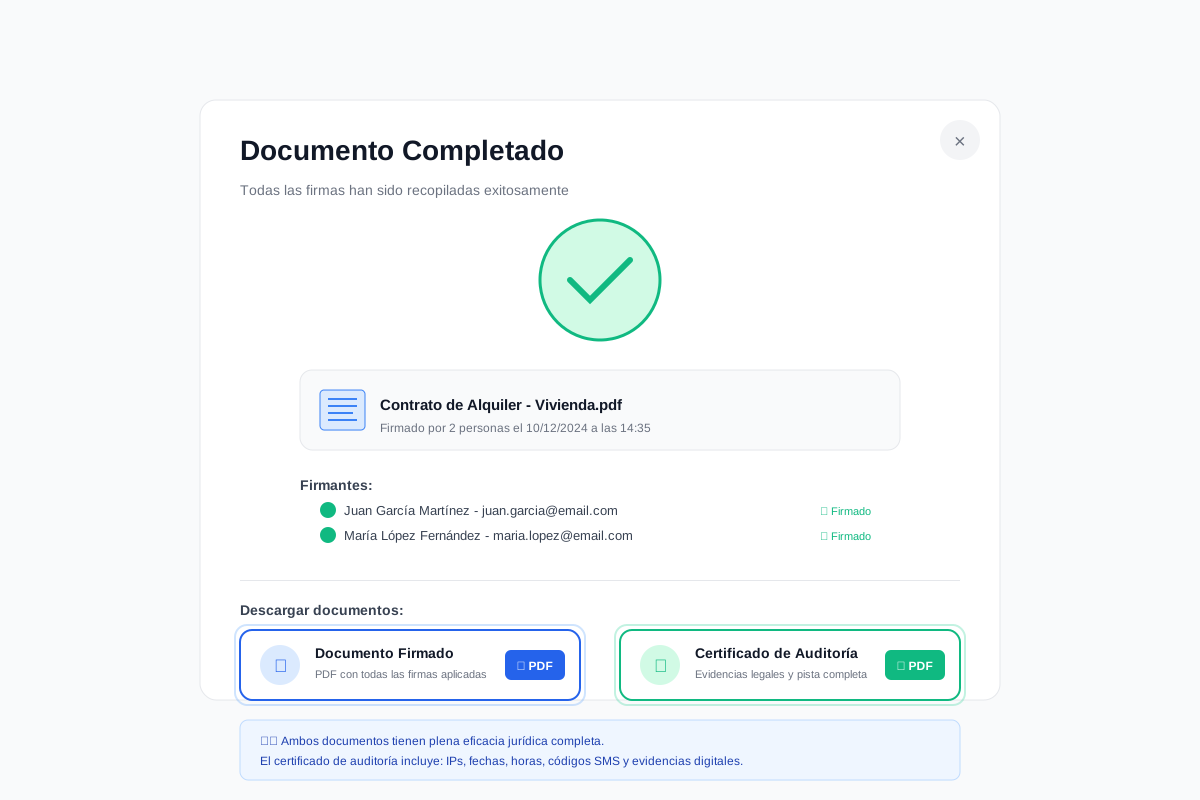
Once all signers have completed their signature, the document moves automatically to the "Signed" state and you can download two important files:
Signed document
The original document with all electronic signatures applied, timestamped and digitally certified.
Includes:
- ✓ All signers' signatures
- ✓ Qualified timestamp
- ✓ Certification metadata
- ✓ Unique verification code
Audit certificate
Legal document certifying the full signing process with evidentiary value before the courts.
Includes:
- ✓ Full audit trail
- ✓ Date, time and IP for each signature
- ✓ eIDAS certificates
- ✓ SMS authentication evidence
⚠️ Important for legal effect:
Store both files securely. The audit certificate is the legal evidence you'll need if you ever have to prove signature validity in court. Without it, the document loses its evidentiary strength.
🔒 Secure storage:
All signed documents are stored securely on our platform for at least 5 years, meeting legal retention requirements. You can access them anytime from your dashboard.
✅ What to do with the downloaded files:
- Keep them safe (encrypted cloud, local backup)
- Send a copy to each signing party
- Archive the audit certificate together with the document
- For lease agreements, send a copy to your accountant or advisor
- For commercial contracts, archive per your compliance policies
Legal validity and certification
Our electronic signature system meets the highest European legal standards and has full legal effect:
eIDAS Regulation
Compliant with EU Regulation 910/2014 on electronic identification and trust services. Our signatures have the same legal value as a handwritten signature.
Certified QTSP
We use Signaturit, an EU-certified Qualified Trust Service Provider. This guarantees full legal effect across all EU member states.
Timestamping
Every signature includes a qualified timestamp certifying the exact date and time, impossible to manipulate. This guarantees the temporal integrity of the document.
Non-repudiation
Signers cannot deny having signed. The audit certificate includes irrefutable evidence: SMS authentication, IP, geolocation and biometrics.
⚖️ Admissibility as judicial evidence
Documents signed with our system are fully admissible as evidence in court under article 326 of the Spanish Civil Procedure Act (LEC):
"When the authenticity of a private document is challenged, if the party against whom it operates expressly acknowledges it, or does not categorically deny it, the document shall be deemed authentic. If denied, it shall be subject to comparison."
The audit certificate provides a presumption of authenticity, shifting the burden of proof: anyone denying the signature must prove they did not sign.
Main use cases
Our electronic signature system is ideal for a wide range of documents and situations:
Real estate contracts
- • Housing rental contracts
- • Earnest money deposits
- • Commercial leases
- • Purchase options
Employment contracts
- • Permanent contracts
- • Fixed-term contracts
- • Internship agreements
- • Annexes and amendments
Commercial contracts
- • NDAs / confidentiality
- • Service agreements
- • Commercial sales
- • Shareholder agreements
Financial documents
- • Loan agreements
- • Debt acknowledgements
- • Promissory notes
- • Guarantees
Digital / Tech
- • Web/app development contracts
- • Software licenses
- • Service Level Agreements (SLA)
- • Terms and conditions
Other documents
- • Powers of attorney
- • Vehicle transfers
- • Donations
- • Authorizations
Frequently asked questions
❓ How long does the full signing process take?
Sending the document takes less than 1 minute. Each signer needs 2–5 minutes to sign. The full process can be completed in less than 30 minutes if every signer is available.
❓ Can I send the same document to multiple people?
Yes, you can add up to 6 signers in a single process. They all receive the document at the same time and can sign in any order (unless you set a sequential order).
❓ What if a signer doesn't receive the email?
It may be in their spam folder. You can resend the email from your tracking dashboard. If the issue persists, double-check the email address and contact support.
❓ Can I cancel a signing process once sent?
Yes, as long as the document is not fully signed, you can cancel the process from your dashboard. Credits are not refunded once sent because the Signaturit service has already been used.
❓ Do signers need a Docu Legalia account?
No. Signers only need to access the link they receive by email. No registration is required. The whole flow is fully accessible without an account.
❓ How valid is electronic signature in court?
SMS Advanced Signature has full legal validity equivalent to a handwritten signature notarized before a notary, under the eIDAS Regulation. It is admissible as evidence in court with presumption of authenticity. The audit certificate provides the necessary evidence.
❓ Can I use electronic signature for any contract?
Electronic signature is valid for most contracts. However, certain documents require a notarial public deed (e.g. real estate sales, wills, marital agreements). Consult a lawyer for specific cases.
❓ How long are documents stored?
We store all signed documents securely for at least 5 years, in line with legal retention requirements. You can access them at any time from your dashboard.
❓ Does the SMS code cost the signer anything?
No. The SMS is fully free for the signer. The cost is included in the credits you pay when you send the document. The signer does not pay anything to receive or sign.
❓ What if a signer rejects the document?
If a signer rejects the document, you receive an automatic notification. The document is marked "Rejected" and you can see the reason if the signer provided one. Credits are not refunded, but you can edit the document and resend it. A technical failure where the envelope never goes out is different: in that case your credits are refunded automatically.
Ready to sign your documents online?
Create your free account and start signing documents with full legal effect in minutes.